In short
- Microsoft Sticky Notes, the classic app preinstalled on Windows 11, is free and syncs to OneNote on your phone when you sign in, but it can't keep a note on top of other windows and has no reminders.
- Free alternatives for Windows: Simple Sticky Notes has repeating alarms and checklists, Stickies by Zhorn Software has alarms and notes tied to programs, and Pinny Notes is an open-source note that stays on top.
- Paid apps with reminders, at November 2026 prices: Notezilla costs $29.95 once, or $29.95 and then $19.95 a year, and adds folders, notes attached to windows and phone apps; Vov Sticky Notes costs $19 once.
- Peeky Notes keeps notes in a deck at the edge of the screen and in a file on your PC, for $5.99 once after a 7-day trial, but it has no reminders or phone app.
We make Peeky Notes, so read this knowing that. We have tried to be fair: every claim about another app is checked against that app's own pages, linked under Sources, and we say where it does something better.
On this page
- How we chose
- The seven apps side by side
- Microsoft Sticky Notes - built in and free
- Peeky Notes - notes at the edge of the screen
- Simple Sticky Notes - free, with reminders and checklists
- Notezilla - reminders, folders and phone apps
- Stickies by Zhorn Software - the lightweight classic
- Vov Sticky Notes - reminders for a one-time price
- Pinny Notes - free, open source, always on top
- What about Google Keep, OneNote and older apps?
- How to choose the best sticky notes app for Windows
- Questions
The best sticky notes app for Windows depends on what you need it to do. For a free note on the desktop, the classic Microsoft Sticky Notes app is already on Windows 11. For free reminders and checklists, try Simple Sticky Notes; for reminders, folders and notes on your phone, Notezilla; and for notes kept out of the way and stored in a file on your PC, Peeky Notes. Our pick for each need comes first, then the details.
- Built in and free: Microsoft Sticky Notes, the classic app already on Windows 11. It syncs to your phone if you sign in, but can't keep a note on top.
- Out of the way, kept on your PC: Peeky Notes, a deck of notes at the screen edge that open when you point at them. $5.99 once, after a 7-day trial.
- Free, with reminders and checklists: Simple Sticky Notes, free at home and at work.
- Reminders and heavy organisation: Notezilla, with folders, notes tied to windows and phone apps through paid sync. From $29.95.
- A lightweight classic: Stickies by Zhorn Software, free and small, with alarms and notes attached to programs or websites.
- Reminders for a small one-time price: Vov Sticky Notes, $19, with a portable version.
- Free, open source and always on top: Pinny Notes, a plain note that stays above every window.
How we chose
We looked at five things in each desktop sticky notes app:
- How notes sit on screen: floating, pinned above everything, tied to a window, or tucked at the screen edge.
- Where notes are stored, and whether you need an account: a file on your PC, the maker's cloud, or your Microsoft account.
- How you pay: free, once, or every year.
- Whether it's maintained: we left out apps whose makers have stopped updating them.
- The features people ask about most: reminders, checklists, export and sync.
We compared what each maker documents - website, help pages, release notes and store listing - as of 14 November 2026, rather than running lab tests of our own. Every fact about another app comes from a page listed under sources, and the order is not a ranking. We only included apps you install on Windows, not websites, whiteboards or full note-taking apps.
The seven apps side by side
A tick or a cross is a plain yes or no. "Not listed" means the maker's pages don't mention it, and anything less simple gets a few words.
| App | Price | Account needed | Sync and phone | Always on top | Reminders | Checklists | Export | Last release |
|---|---|---|---|---|---|---|---|---|
| Microsoft Sticky Notes (classic app) | Free | Only to sync | Yes, when signed in | No (Sticky Notes in OneNote can pin a note) | No | No; bullets and strikethrough | No button; Microsoft points to Outlook.com | 6.1.4.0, no date published |
| Peeky Notes | $5.99 once, 7-day trial | Not for the trial; sign-in activates a licence | No | The deck, not note windows | No | Yes | Markdown or text | 1.2.0, Oct 2026 |
| Simple Sticky Notes | Free | No | No | Yes | Yes, repeating | Yes | RTF or TXT | 6.9, Feb 2026 |
| Notezilla | $29.95 once, or $29.95 then $19.95 a year | Only to sync | Yes, with paid sync | Yes | Yes, repeating | Yes | HTML, CSV or tab-separated | 9.0.44, Nov 2026 |
| Stickies (Zhorn Software) | Free | No | No; sends notes to other PCs | Yes | Alarms and notes that wake | Checkboxes in text | Single notes as .sti files | 10.2a, Jan 2025 |
| Vov Sticky Notes | $19 once, free to try | None mentioned; licence key | Not listed | Yes | Yes, once or repeating | Not listed | TXT, RTF, backup file | 11.1, Oct 2026 |
| Pinny Notes | Free, open source | None mentioned | Not listed | Yes | Not listed | Not listed | Not listed | 1.17.0, Mar 2026 |
Microsoft Sticky Notes - built in and free
Microsoft Sticky Notes is the one you probably already have: the classic Microsoft Store app comes free and preinstalled on Windows 11. Microsoft also makes a newer Sticky Notes inside the free OneNote app, opened with WinAltS, which adds screenshots linked to their source, docking beside your other apps and pinning a note on top. They are different products, so each point below says which one it means. Best for: a free note on the desktop today, and the same notes on your phone.
What it does well:
- Nothing to install or buy: the classic app comes with Windows 11 and has no in-app purchases.
- No account needed to start. Microsoft says the classic app works without signing in; sign in with a Microsoft account and notes sync to OneNote on iPhone and Android, to Outlook and to the web.
- The basics, in the classic app: bold, italic, underline, strikethrough, bullets, pictures, pen input, dark mode and search.
- Sticky Notes in OneNote can pin a popped-out note above other apps (since September 2024).
What to know first, and the usual reasons people look for a Microsoft Sticky Notes alternative:
- The classic app can't keep a note on top of other windows. Microsoft says so itself, and suggests pinning Sticky Notes to the taskbar instead.
- The classic app has no reminders and no export button. Microsoft points to Outlook.com, and only for synced notes; see how to export sticky notes to text or Markdown.
- Signed out, the classic app keeps notes only on that PC, and uninstalling or resetting it deletes them. Deleting a note is permanent, and you can't change the font or text size.
- Sticky Notes in OneNote isn't everywhere: Microsoft says it won't work on PCs managed with Intune policy or with Office LTSC licences, though it recommends that version for new features.
Price and platforms: free. The classic app runs on Windows 10 and 11, with synced notes in OneNote on iPhone, iPad and Android. If it's missing, get it from the Microsoft Store. More in Peeky Notes vs Microsoft Sticky Notes and using sticky notes without a Microsoft account.
Peeky Notes - notes at the edge of the screen
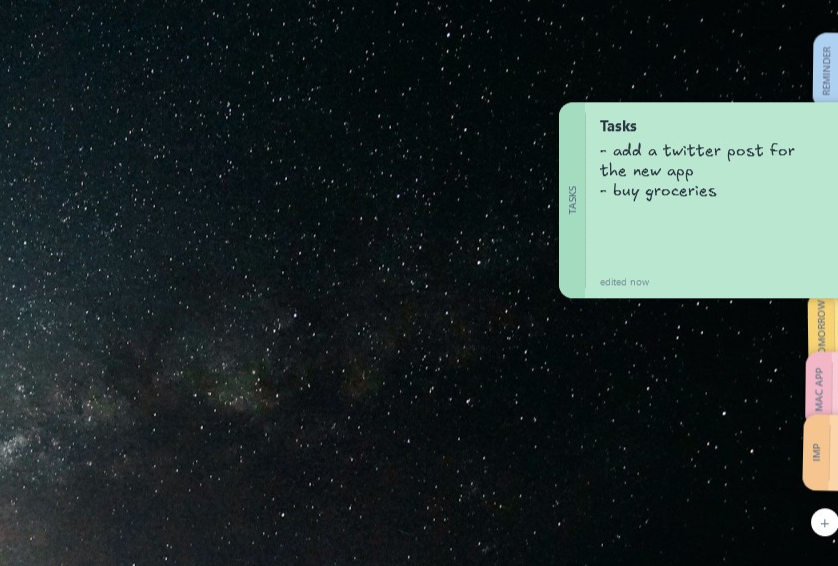
Peeky Notes keeps your notes in a deck on the left or right edge of the screen. At rest it's a thin strip of coloured pills; point at the edge and the notes fan out as tabs, hover one to read it, and click to edit it in its own window. Notes are saved to one file in Documents\Peeky Notes, and Peeky Notes never uploads them (if OneDrive backs up your Documents folder, the file goes with it). Best for: notes within reach that don't cover your work, kept on your own PC.
What it does well:
- Out of the way until you want it. The deck stays on top, but clicks pass through it except on its pills, tabs and buttons, and Hide over fullscreen apps, on by default, keeps it out of games and presentations.
- Lists that keep up: bullets, numbers and checklists, with Move completed to the bottom for ticked tasks.
- Easy to get notes out: export a note as Markdown or text, or use Back up… in Settings to save every note as Markdown plus a restorable backup. Text and Markdown files import too.
- Quick from anywhere: CtrlAltN for a new note, CtrlAltA for the All Notes window, where you search and archive.
What to know first:
- No reminders, no sync, and no phone or Mac app.
- Note windows don't stay on top; only the deck does.
- One strip on one display, showing up to eight notes as tabs; the rest are a click away in All Notes. Notes are text only, with no pictures, tags or folders.
- It's new: version 1.0 came out in September 2026. After the trial, notes stay readable and exportable, but editing needs a licence, activated by signing in with an email code or a Google or Microsoft account.
Price and platforms: $5.99 once for a licence that covers two devices at a time, after a 7-day trial with no account, no email and no card. Windows 10 (version 1809 or later) and 11, x64 only, from the Microsoft Store. See how the deck works and why sticky notes belong at the edge of the screen.
Simple Sticky Notes - free, with reminders and checklists
Simple Sticky Notes is freeware from Simnet that has been around since 2008; version 6.9 came out on 22 February 2026. Notes are separate windows on the desktop, kept in a local file, Notes.db, in Documents\Simple Sticky Notes unless you move it. Best for: a free desktop sticky notes app with alarms and checklists, at home or at work.
What it does well:
- Free for personal and commercial use.
- Alarms that repeat daily, weekly, monthly or yearly, with snooze.
- Checklists (since 2024), rich text with fonts, colours and highlighting, and any note can be set always on top.
- Organised, and easy to get out: a Note Explorer with notebooks, search and a trash, export to RTF or TXT, printing, and backup and restore.
- Starts with Windows if you like, with hotkeys you can change.
What to know first:
- Windows only, with no sync, phone app or web version.
- Installer only: it installs for all users and asks for administrator rights, and the maker offers no portable version.
Price and platforms: free. Windows 11, 10, 8.1, 8 and 7. Download it from simplestickynotes.com, and see Peeky Notes vs Simple Sticky Notes.
Notezilla - reminders, folders and phone apps
Notezilla, from Conceptworld, is a full organiser built on sticky notes, with a Notes Browser behind the desktop notes that holds far more than fits on screen. Version 9.0.44 came out on 10 November 2026. Best for: people who run their day from notes and want them on a phone too.
What it does well:
- Reminders with options: a due date and time, repeats, your own sound, even opening a program or website.
- Notes stuck to your work: attach a note to a window, document, website or folder, matched by the window's title, and it appears when that window opens.
- Room to organise: memoboards (folders), checklists, and notes that stay on top or stay visible after WinD, the default since version 9.0.36.
- Phones and the web: free Android and iPhone apps and a web app, synced through Conceptworld's Notezilla.Net.
- Your data stays usable: stored on your PC by default, single notes lockable with a password, and export to HTML, CSV or tab-separated files.
What to know first:
- It costs the most here, and sync is paid. The one-time licence covers two PCs and a phone, with sync for the first year only; the subscription keeps sync going on all your PCs.
- Syncing a phone, and the web app, need a Notezilla.Net sync account.
- It does a lot, which is more than you need for a note or two.
Price and platforms: $29.95 once, or $29.95 for the first year and $19.95 a year after, with a fully functional 30-day trial. Windows 11 and 10, 32- or 64-bit, with a portable version. See conceptworld.com, or Peeky Notes vs Notezilla.
Stickies by Zhorn Software - the lightweight classic
Stickies is freeware written by one developer at Zhorn Software, with a public changelog going back to 2009. It keeps everything in one SQLite file in %APPDATA%\stickies. The latest version, 10.2a, came out in January 2025, and the developer was still answering on the support forum in November 2026. It is not Apple's Stickies for Mac, which is a different app. Best for: tinkerers and offices that want a free app with alarms, notes tied to programs, and notes sent between PCs.
What it does well:
- Free at home and at work, with no nag screens or locked features.
- Two kinds of reminder: alarms, and notes that sleep until a date or wake every day, week or month.
- Notes tied to what you're doing: attach one to an application, website, document or folder and it shows only when that is on screen.
- Sharing and scripting: send notes to other Stickies users on your network or by email, and drive it from other programs through an API.
- Plenty per note: keep it on top, add checkboxes, make it an image, or save it as a
.stifile.
What to know first:
- No cloud sync or phone app. Notes move between PCs over the network or by email; backups can go to a Dropbox or OneDrive folder.
- Show Desktop hides your notes. The developer considers that correct and suggests WinM instead of WinD.
- Updates are occasional, and it's a 32-bit app.
Price and platforms: free, with optional donations. Windows 7, 8, 10 and 11. Download it from zhornsoftware.co.uk, and see Peeky Notes vs Stickies.
Vov Sticky Notes - reminders for a one-time price
Vov Sticky Notes is a paid app from Vovsoft that is updated often: version 11.1 came out on 16 October 2026, less than a month after 11.0. It comes as an installer or a portable copy. Best for: reminders and a portable copy for a low one-time price, on new or old Windows.
What it does well:
- Reminders that appear once or on a regular schedule.
- Three kinds of note: rich text, pictures or screenshots, and a built-in web browser.
- A Stay On Top button, plus support for several monitors and high-DPI screens.
- Offline storage with backup import and export, and notes can be saved as TXT or RTF files.
- $19 once, valid for good, with future updates included.
What to know first:
- The free-to-try version is limited: themes, backups and commercial use need a licence, and it shows a nag screen.
- Windows only. The site mentions no phone app or sync, and doesn't say how many PCs a licence covers.
Price and platforms: $19 once. Windows 11, 10, 8.1, 8, 7 and Vista, 32- or 64-bit. See vovsoft.com.
Pinny Notes - free, open source, always on top
Pinny Notes is a free, open-source app (GPL-2.0) whose main idea is in its name: pin a note and it stays above every other window. One developer works on it in their spare time; version 1.17.0 came out on 10 March 2026. Best for: a free, plain note that stays in view, especially if you work with code or text.
What it does well:
- Pinned notes stay on top, and an option stops notes being minimised, even by the Show Desktop button.
- Small comforts: auto-save, colours, dark mode, transparency and a spell checker.
- Text tools built in: Base64, hashes, GUIDs, JSON formatting, case changes and more, from the right-click menu.
- Install it or run it portable, and read the code if you want to.
What to know first:
- No reminders, checklists, export or sync appear in its feature list.
- A spare-time project: releases depend on one person, and the latest was in March 2026.
Price and platforms: free. Windows only. Get it from GitHub.
What about Google Keep, OneNote and older apps?
Google Keep has reminders and lists and syncs with its phone apps, but it isn't a sticky notes app for PC: Google offers no Windows app, points computer users to keep.google.com, and offers offline access only in its mobile apps. OneNote is a free notebook app rather than sticky notes; it matters here as the home of Microsoft's newer Sticky Notes, and Sticky Notes vs OneNote vs Notepad vs To Do explains which Microsoft app suits which job.
Some apps that older lists still recommend have stopped. StickyPad's developer says its final version came out in October 2013, and PNotes.NET's last release announcement dates from 2019. 7 Sticky Notes, StickyPad, Hott Notes and PNotes covers where each stands, how to get your notes out and what to use instead.
How to choose the best sticky notes app for Windows
Start from the one thing you can't do without:
If you need notes on your phone
- Microsoft Sticky Notes, free: sign in to the classic app and your notes show up in OneNote on iPhone and Android.
- Notezilla: free phone apps, synced through its paid Notezilla.Net. The other apps here are Windows-only.
If you need reminders
- Free: Simple Sticky Notes or Stickies. Paid: Vov Sticky Notes ($19 once) or Notezilla (from $29.95).
- The classic Microsoft Sticky Notes app and Peeky Notes have no reminders.
If a note must stay above everything
- Simple Sticky Notes, Stickies, Notezilla, Vov Sticky Notes and Pinny Notes can pin a note on top.
- Microsoft's newer Sticky Notes in OneNote can pin a popped-out note; the classic app can't. Peeky Notes keeps its deck on top, but not its note windows. More in keeping a sticky note always on top.
If you don't want to pay
- Classic Microsoft Sticky Notes, Simple Sticky Notes, Stickies and Pinny Notes are free.
- Notezilla gives you 30 days to try everything, Peeky Notes 7.
If you'd rather not have an account
- Simple Sticky Notes and Stickies have no sign-in. Classic Microsoft Sticky Notes and Notezilla need one only to sync.
- Peeky Notes needs none for the trial, and a bought licence is activated by signing in. Either way, the app never uploads your notes.
If you want notes near, but not in the way
- Peeky Notes keeps them at the edge of the screen, one hover away; screen-edge notes apps for Windows compares others that do.
- Notezilla and Stickies can attach a note to a window, so it appears with that window.
Questions
Can Microsoft Sticky Notes stay on top of other windows?
Not the classic app: Microsoft's own support pages say it can't stay on top of other applications. The newer Sticky Notes in the OneNote app can pin a popped-out note above other windows, and our guide to keeping a sticky note always on top covers the other ways.
Which sticky notes app works best without an internet connection?
Simple Sticky Notes, Stickies, Notezilla, Vov Sticky Notes and Peeky Notes keep notes on your PC, and classic Microsoft Sticky Notes works signed out. A licensed Peeky Notes checks its licence about every six hours when it can, and keeps working offline for up to 14 days between successful checks. Google Keep is the exception: as of November 2026, it has no offline access on a computer.
Can reminders and alarms be set on sticky notes in Windows 11?
Not in the classic Microsoft Sticky Notes app or in Peeky Notes, which have no reminders. Simple Sticky Notes and Stickies have free alarms, and Notezilla and Vov Sticky Notes have reminders in paid apps you can try first.
Is it possible to put a checkbox in sticky notes?
Microsoft documents bullets and strikethrough for the classic Sticky Notes app, but no checkboxes. Simple Sticky Notes, Notezilla and Peeky Notes have checklists you tick off, and Stickies can insert checkboxes into a note; see a to-do checklist on your Windows desktop.
Is there a way to show sticky notes on the desktop without installing anything?
On Windows 11, yes: the classic Microsoft Sticky Notes app comes preinstalled. Press the Windows key, type sticky notes and press Enter; if it isn't there, Microsoft says to install Microsoft Sticky Notes from the Microsoft Store. More in keeping sticky notes on your desktop in Windows 11.
Sources
Checked on 14 November 2026. Apps change - if something here has gone out of date, write to [email protected] and it will be corrected.
- Get started with Sticky Notes - Microsoft Support
- See your sticky notes on other devices and the web - Microsoft Support
- Create a sticky note - Microsoft Support
- Troubleshoot Sticky Notes - Microsoft Support
- Where did my Sticky Notes go? - Microsoft Support
- Use a screen reader with Sticky Notes - Microsoft Support
- Microsoft Sticky Notes - Microsoft Store
- Microsoft Sticky Notes package data - Microsoft Store catalogue
- End of support for Cortana - Microsoft Support
- Policy-based removal of pre-installed Microsoft Store apps - Windows IT Pro Blog
- Introducing the new Sticky Notes app on Windows - Microsoft 365 Insider Blog
- Remember better with the new Sticky Notes experience from OneNote - Microsoft 365 Blog
- OneNote's new Sticky Notes feature for Windows receives update - Microsoft 365 Blog
- What's the difference between the OneNote versions? - Microsoft Support
- Download Simple Sticky Notes - Simple Sticky Notes
- Version history - Simple Sticky Notes
- Help - Simple Sticky Notes
- Simnet.SimpleStickyNotes 6.9 manifest - winget-pkgs on GitHub
- Simple Sticky Notes - FileHorse
- Notezilla - Conceptworld
- Buy Notezilla 9 - Conceptworld
- Download Notezilla 9 - Conceptworld
- Notezilla release notes - Conceptworld
- Reminders and due dates - Notezilla help
- Sticking notes to documents and websites - Notezilla help
- Making sticky notes stay on top - Notezilla help
- Locking and password-protecting notes - Notezilla help
- Getting started with Notezilla.Net - Notezilla help
- How to take a backup of sticky notes - Conceptworld Q&A
- Notezilla on a private server and data export options - Conceptworld Q&A
- Stickies - Zhorn Software
- Download Stickies - Zhorn Software
- Stickies versions - Zhorn Software
- KB00008 - Can I pin Stickies to the desktop - Zhorn Software
- KB00037 - Does Stickies work on an Apple computer? - Zhorn Software
- KB00083 - How do I open .sti files? - Zhorn Software
- KB00095 - Moving the data file location - Zhorn Software
- Closing a sticky - Zhorn Software forum
- ZhornSoftware.Stickies 10.2a manifest - winget-pkgs on GitHub
- Vov Sticky Notes - Vovsoft
- Vov Sticky Notes version history - Vovsoft
- Pinny Notes - GitHub
- Pinny Notes releases - GitHub
- Migrate from the Keep Chrome app - Google Keep Help
- Google Keep - Google Workspace
- StickyPad - Green Eclipse
- PNotes news - SourceForge

Peeky Notes
Sticky notes for Windows 10 and 11
Notes that wait at the edge of your screen.
Seven days with everything unlocked, no account and no card. Then one licence, bought once - and if you never buy, your notes stay readable and exportable.
 Peeky Notes