In short
- Stickies by Zhorn Software is freeware, free at home and at work, and its developer lists Windows 7, 8, 10 and 11 as supported. The latest version is 10.2a, from January 2025, and the developer was still answering questions on its forum in November 2026.
- Stickies has many features Peeky Notes does not: alarms, notes that sleep or recur, notes attached to a program, document or website, image notes, skins and transparency, and sending notes to other Stickies users over a network or by email.
- Peeky Notes keeps notes off the desktop, in a deck at the left or right screen edge that opens when the pointer reaches it and, by default, hides over fullscreen apps. Stickies shows each note as its own window, where you leave it.
- Peeky Notes costs $5.99 once after a 7-day trial with no account, no email and no card, and installs from the Microsoft Store. Stickies is not in the Microsoft Store: it comes from Zhorn Software's website, winget, Chocolatey or PortableApps.com.
We make Peeky Notes, so read this knowing that. We have tried to be fair: every claim about another app is checked against that app's own pages, linked under Sources, and we say where it does something better.
On this page
- Peeky Notes vs Stickies at a glance
- How each puts notes on your screen
- What Stickies can do that Peeky Notes can't
- What Peeky Notes does differently
- Where each keeps your notes
- Is Stickies still maintained, and does it work on Windows 11?
- Price: free vs a one-time licence
- Switching from Stickies to Peeky Notes
- Is Peeky Notes the right Stickies alternative for you?
- Questions
If Stickies by Zhorn Software does what you need, you may not need a Stickies alternative at all: it is free, it still runs on Windows 11, and it does a great deal that Peeky Notes cannot, from alarms to notes attached to a particular program or website. Peeky Notes suits a different habit. It keeps your notes out of sight at the edge of the screen, one movement of the mouse away, for $5.99 once. Choose it for a clear desktop and a simpler app; stay with Stickies for alarms, attached notes, image notes or sending notes to other people.
Peeky Notes vs Stickies at a glance
| Peeky Notes | Stickies (Zhorn Software) | |
|---|---|---|
| Price | $5.99 once, after a 7-day trial | Free, at home and at work |
| Latest version | 1.2.0, October 2026 | 10.2a, January 2025 |
| Windows | Windows 10 (version 1809 or later) and 11, on x64 PCs | Windows 7, 8, 10 and 11 |
| Where to get it | Microsoft Store | Zhorn Software's website, winget, Chocolatey or PortableApps.com |
| Where notes appear | In a deck at the left or right screen edge | As separate windows, where you leave them |
| Always on top | The deck is; note windows are not | Any note you choose |
| Alarms, sleeping and recurring notes | No | Yes |
| Notes attached to a program, document or website | No | Yes |
| Image notes and screen grabs | No | Yes |
| Checklists | Yes, started as you type | Checkboxes |
| Look | 8 colours, 4 fonts | Your own colours and fonts, saved styles, skins, transparency |
| Send notes to other people | No | Over the network or by email |
| Works without an account | During the 7-day trial; a licence unlocks by signing in | Yes |
| Where notes are kept | One JSON file in Documents\Peeky Notes | One SQLite file in %APPDATA%\stickies |
| Automatic backups | The previous save only; full backups with Back up… | Yes |
| Starts with Windows | Start with Windows switch, off by default | From a shortcut in the Startup folder |
| Export | One note as Markdown or text; every note as Markdown with Back up… | Single notes as .sti files; the data file is open SQLite |
| Portable (USB stick) mode | No | Yes |
| Sync, phone or Mac app | No | No |
How each puts notes on your screen
Stickies: each note is a window you place
Zhorn Software's site says Stickies notes “remain where placed until closed, even through reboots”, can be resized, and snap to each other and to the sides of the screen. Notes can be kept on top, made see-through, rolled up, gathered into stacks, or attached to an application, web site, document or folder so that they only show alongside it.
Because each note is an ordinary window, Show Desktop (WinD) hides them along with everything else. The developer's advice is to press WinM instead, which minimises your other windows and leaves the notes showing.
Peeky Notes: notes tucked into the screen edge
Peeky Notes keeps notes in the deck, on the left or right edge of one screen; you pick the edge, and the display if you have more than one, in Settings. At rest it is a thin strip of coloured pills. Move the pointer to the edge and up to eight notes come out as tabs, titles turned sideways; hover one and it opens out so you can read it; click it and the note opens in its own window.

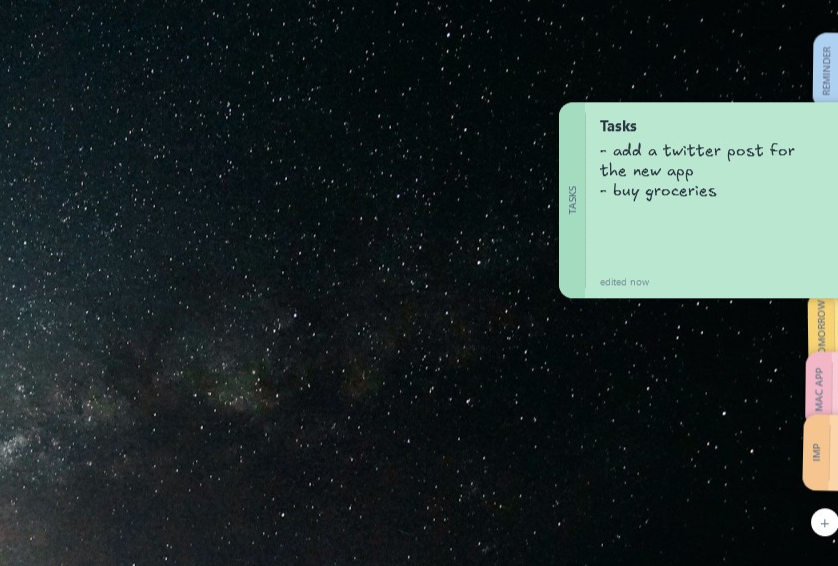
The deck stays above other windows, has no taskbar button, and Hide over fullscreen apps, on from the start, keeps it out of games and presentations. Note windows are ordinary windows: they open in the middle of the screen, are not kept on top, and are not reopened when the app next starts. Notes that don't fit as tabs are one click away in the All Notes window.
That is the real choice between the two. If you want a note fixed beside a particular window, or kept above everything all day, Stickies does it and Peeky Notes does not; keeping a sticky note always on top covers other ways to do that. If you want a clear desktop with your notes a hover away, that is what Peeky Notes is for, and why sticky notes belong at the edge of the screen explains the thinking.
What Stickies can do that Peeky Notes can't
Stickies' website and version history list far more than Peeky Notes offers:
- Alarms, so a note gets your attention at a time you choose.
- Sleeping and recurring notes, hidden until a date and time, or waking every day, week or month as a reminder.
- Attached notes, which appear only while a particular application, web site, document or folder is on screen.
- Image notes, including screen grabs straight into a note.
- Sending notes to other Stickies users over a network, or by email.
- Skins, saved styles, transparency and a dark mode, with 461 skins in its online gallery as of November 2026.
- A Manage window with search, tags, stacks and stored notes kept off the desktop.
- Printing, a portable mode for running from a USB stick, Group Policy settings for offices, an API for other programs, and 17 downloadable translations.
Peeky Notes has no reminders, images, skins or transparency, and no way to attach a note to a window, or to send or print one. Its All Notes window searches and archives notes, but there are no tags, stacks or folders. If you use Stickies for any of these, it is the better app for you, and our roundup of the best sticky notes apps for Windows covers other options.
What Peeky Notes does differently
Peeky Notes is a smaller, simpler app:
- Lists that start as you type. Begin a line with
-,1.or[ ]and a space for a bulleted list, a numbered list or a checklist. Ticked tasks can move to the bottom of their list. - Plain formatting. Bold, italic, underline, strikethrough and links, four fonts (Handwritten, Normal, Rounded and Typewriter) and eight colours.
- One window for everything. The All Notes window searches, sorts, archives and reorders every note, and CtrlAltN makes a new note from anywhere in Windows.
Where each keeps your notes
Stickies keeps everything - notes, settings and stored notes - in one SQLite database, stickies.db, by default in %APPDATA%\stickies. It saves ten seconds after your last change and when it closes, and takes periodic automatic backups into a backups subfolder there. The developer calls the format an open one and recommends DB Browser for SQLite for reading it.
Peeky Notes keeps every note in one file, Documents\Peeky Notes\notes.json, written under a second after you stop typing, with the previous save kept beside it as notes.json.bak. The file stays put if the app is uninstalled, and Peeky Notes never uploads it. Nothing is backed up on a schedule: Settings > Your notes > Back up… writes every note as a Markdown file, plus a backup that Restore… brings back exactly. Our guide to backing up sticky notes and moving them to a new PC has the steps.
Neither app syncs, and neither has a phone app. Stickies can send notes to another PC over the network or by email; Peeky Notes moves them between PCs with Back up… and Restore….
Is Stickies still maintained, and does it work on Windows 11?
Yes to both, with a note about pace. Zhorn Software's download page says “Stickies runs on Windows 7, 8, 10 and 11”, although the product's home page still lists only 7, 8 and 10. In the official forum's thread titled “Doesn't work on windows 11”, the developer replied in January 2024 that “Stickies works fine under W11”. The problem another user then reported turned out to be Windows 11 not showing the app's icon in the notification area: Stickies had been running all along.
Updates are slow. The latest version, 10.2a, came out in January 2025, the ninth release of version 10 since December 2019, and nothing newer had appeared by November 2026. Like Peeky Notes, Stickies is one person's work: its developer says “I code for fun, rather than to try to make money”, and was still answering questions on the official forum in November 2026. That is a supported app with a slow release pace, not an abandoned one.
Stickies is not in the Microsoft Store. It comes as an installer or a ZIP from Zhorn Software's website, and also through winget (as ZhornSoftware.Stickies), Chocolatey and PortableApps.com. The download page warns that some antivirus products have flagged Stickies and its installer; the developer says these are false positives and that the app is clean.
Peeky Notes is new by comparison: version 1.0.0 came out in September 2026, and every release is on the changelog.
Price: free vs a one-time licence
Stickies is freeware. Its download page says you can use it “on any number of computers for as long as you like” without paying, at home or at the office, and promises no locked features, no time delays and no nag screens. Donations are optional, through a PayPal button on the site.
Peeky Notes costs $5.99 once for a perpetual licence that covers two devices at once - not a subscription. The 7-day trial has everything unlocked and needs no account, no email and no card. After the trial your notes stay readable, searchable and exportable, and making or changing notes needs a licence. A licence belongs to an account, and signing in, with a code by email or a Google or Microsoft account, is how the app unlocks. Why Peeky Notes is a one-time purchase explains the choice.
Switching from Stickies to Peeky Notes
Peeky Notes can't read Stickies' data file. It imports .txt and .md files from the All Notes window, each file becoming a new note, with Markdown arriving as plain text, and you can paste in the text of any note. Alarms, sleeping notes, attachments and image notes have no equivalent, so check which of those you rely on before you switch. Once you have, turn on Start with Windows in Settings (it is off by default) so the deck is there after a restart; opening sticky notes automatically when Windows starts has more.
Is Peeky Notes the right Stickies alternative for you?
Stay with Stickies if
- You want it free, at home or at work
- You rely on alarms, sleeping or recurring notes
- You attach notes to particular programs, documents or websites
- You keep image notes, or send notes to other people
- You still use Windows 7 or 8, or want to run it from a USB stick
Choose Peeky Notes if
- You want a clear desktop, with your notes a hover away at the screen edge
- You want notes kept out of fullscreen games and presentations
- You want lists and checklists that start as you type
- You would rather install and update through the Microsoft Store
- You want notes you can export as Markdown
Questions
Is Zhorn Stickies still being updated?
Slowly. The latest version, 10.2a, came out in January 2025 and nothing newer had been released by November 2026, but the developer was still answering questions on the official Stickies forum that month.
Does Stickies work on Windows 11?
Yes. Zhorn Software's download page lists Windows 7, 8, 10 and 11, and the developer has said Stickies works fine under Windows 11. If it seems not to start, check whether Windows 11 is hiding its icon in the notification area.
Is Stickies free for commercial use?
Yes. Stickies is freeware: Zhorn Software says it can be used on any number of computers, at home or at the office, without paying, and that all its applications are free for commercial use. Donations are optional.
Is Stickies in the Microsoft Store?
No. Zhorn Software's Stickies comes from its developer's website, or through winget, Chocolatey or PortableApps.com. The Microsoft Store app named Stickies is a different app, by tsjDEV.
Does Peeky Notes have reminders or alarms like Stickies?
No. Peeky Notes has no reminders, alarms, due dates or notifications. If you rely on Stickies' alarms, sleeping notes or recurring notes, Stickies is the better choice.
Can I move my notes from Stickies to Peeky Notes?
Not automatically. Peeky Notes can't read Stickies' data file, but it imports .txt and .md files as new notes, one note per file, and you can paste in the text of any note. Alarms, attachments and image notes don't carry over.
Sources
Checked on 14 November 2026. Apps change - if something here has gone out of date, write to [email protected] and it will be corrected.
- Stickies - Zhorn Software
- Download Stickies - Zhorn Software
- Stickies Versions - Zhorn Software
- Stickies Skins - Zhorn Software
- Home page - Zhorn Software
- KB00002 - Using Stickies as a portable application - Zhorn Software
- KB00012 - How can I get Windows-D to leave my stickies showing? - Zhorn Software
- KB00015 - Performing a manual or silent installation of Stickies - Zhorn Software
- KB00019 - Can I pay for a branded/custom version of Stickies? - Zhorn Software
- KB00022 - How do I save my stickies data - Zhorn Software
- KB00037 - Does Stickies work on an Apple computer? - Zhorn Software
- KB00040 - What are all the Stickies files? - Zhorn Software
- KB00083 - How do I open .sti files? - Zhorn Software
- KB00092 - Working with Stickies v10 data file - Zhorn Software
- KB00095 - Moving the data file location - Zhorn Software
- Doesn't work on windows 11 - Zhorn Software forum
- Closing a sticky - Zhorn Software forum
- ZhornSoftware.Stickies 10.2a manifest - winget-pkgs on GitHub
- Stickies 10.2.1 - Chocolatey Software
- Stickies Portable - PortableApps.com
- Stickies, by tsjDEV - Microsoft Store
- Stickies, sticky notes for Windows 11 and 10 that dock to your screen edge - stickies.lol
- Keyboard shortcuts in Windows - Microsoft Support
- Customize the Taskbar in Windows - Microsoft Support

Peeky Notes
Sticky notes for Windows 10 and 11
Notes that wait at the edge of your screen.
Seven days with everything unlocked, no account and no card. Then one licence, bought once - and if you never buy, your notes stay readable and exportable.
 Peeky Notes