In short
- There is no SideNotes for Windows: as of November 2026, SideNotes needs macOS 13 or later (its App Store listing says “Only for Mac”, and SideNotes Mobile is a separate iPhone and iPad app), and Hold My Notes is Mac-only too.
- Windows apps that keep notes at the screen edge, as of November 2026: EdgeNote, EdgeNotes, HideNStick Notes, NotePebble, Peeky Notes, Stickene and Stickies.lol. TabStick attaches notes beside individual windows instead.
- As of November 2026, Stickene and TabStick are free and EdgeNote is a subscription at £14.99 a year; EdgeNotes ($3.99), HideNStick Notes ($4.99), Stickies.lol ($4.99 at its early-bird price), NotePebble ($9.99) and Peeky Notes ($5.99) are one-time purchases after a trial.
- Peeky Notes, which we make, was inspired by Hold My Notes: its notes wait at the left or right screen edge and fan out as tabs when you point there, and are kept in a file on your PC. Its 7-day trial needs no account, no email and no card.
We make Peeky Notes, so read this knowing that. We have tried to be fair: every claim about another app is checked against that app's own pages, linked under Sources, and we say where it does something better.
On this page
There is no SideNotes for Windows. SideNotes, made by Apptorium, needs macOS 13 or later (its companion, SideNotes Mobile, is for iPhone and iPad), and Hold My Notes, the Mac app that inspired our own Peeky Notes, is Mac-only too. On Windows 11 and 10 we found seven apps that keep notes at the edge of the screen in a similar way, Peeky Notes among them, and one that attaches notes beside individual windows. The table below compares what each maker documents, checked on 16 November 2026.
Is there a SideNotes for Windows?
No. SideNotes and Hold My Notes are both Mac apps; here is what each offers, from its maker's own pages.
SideNotes
SideNotes captures “notes, tasks, links, and snippets from the edge of your screen without leaving the app you're in”. It stays above other apps, full-screen ones included, and opens with a shortcut, a click on its Open Bar, or by moving the pointer to the screen edge.
As of November 2026 it costs $19.99, a one-time purchase per major version (Apptorium says SideNotes 2 will be a paid upgrade, with a discount for existing users), and Apptorium's website offers a 30-day free trial. Notes are stored on the Mac and, if you turn on iCloud sync, in iCloud, which shares them with SideNotes Mobile for iPhone and iPad, sold separately. The App Store listing says “Only for Mac”, and neither it nor Apptorium's page mentions Windows.
Hold My Notes, and where Peeky Notes comes from
Hold My Notes keeps “a deck docked to the right edge of the screen”: out of the way until you reach over, when the notes fan out. It is a one-time purchase for three Macs - $14.99, or $6.99 at its early-bird price at the time of writing - after a 14-day trial with no account, and its site offers it only for macOS 13 or later.
Peeky Notes, which we make, was inspired by Hold My Notes: it is that idea rebuilt for Windows 10 and 11 by someone who wanted it on a PC, and the app's About page credits the original. If you are on a Mac, get Hold My Notes. Stickies.lol, another Windows app below, also names Hold My Notes as its inspiration.
If you use a Mac and a PC
None of the Windows apps below says it can sync with SideNotes or Hold My Notes, so each computer keeps its own notes. To bring notes across once, Hold My Notes can export each note as a Markdown or plain-text file, and Peeky Notes imports .md and .txt files as new notes, as plain text: Markdown formatting is not converted.
Screen-edge notes apps for Windows 11 and 10
These are the Windows apps we found that keep notes at the screen edge, listed alphabetically, plus TabStick, which works at the edge of each window. Facts come from each maker's site or Microsoft Store listing; we compared what they document rather than testing the apps. On 16 November 2026 none of the six that are in the Microsoft Store, ours included, had any ratings in the US Store yet. “Not listed” means the maker's pages don't say.
| App | Runs on | Price | Where notes are kept | Account needed | Sync | At the edge | Latest update |
|---|---|---|---|---|---|---|---|
| EdgeNote (uziapps) | Windows 10 and 11, 64-bit | £14.99 a year after a 15-day trial | On your PC | Not listed | A backup file moves notes between PCs; shared notes sync | A panel slides in from the right edge; can be pinned open | Store listing updated 18 Oct 2026 |
| EdgeNotes (Molpin Ltd) | Windows 10 (1809 or later) and 11, x64 | $3.99 once, with a free trial | One file per note, in a folder you choose | Not listed | Not listed | Slides out from the left or right edge, then back to a few pixels | Store listing updated 11 Aug 2026; on the Store since 2022 |
| HideNStick Notes | Windows 10 (1809 or later) and 11 | $4.99 once after a 15-day trial | A file on your PC | No | None; nothing is uploaded | A slim rail on the left or right edge; bump the edge twice | Version 1.0.2; Store listing updated 1 Nov 2026 |
| NotePebble | Windows 10 and 11 | $9.99 once after a 7-day trial | A file in %APPDATA%\NotePebble | No | None | Pills on the left or right edge turn into labelled tabs | Version 1.0.5, November 2026 |
| Peeky Notes | Windows 10 (1809 or later) and 11, x64 | $5.99 once after a 7-day trial | A file in Documents\Peeky Notes | Not for the trial; a licence needs sign-in | None | Pills on the left or right edge of one display fan out as tabs | Version 1.2.0, 5 Oct 2026 |
| Stickene | Windows 10 and 11; Android | Free | On your computer | No | Optional, encrypted, across PCs and Android | A strip of coloured squares at the right edge; the stack slides out on hover | Version 0.3.1, 22 Oct 2026 |
| Stickies.lol | Windows 10 and 11, 64-bit | $4.99 once at its early-bird price (regular $14.99), after a 7-day trial | On your PC, encrypted | No | None | A dock on the left or right edge, at the top, middle or bottom | Version 0.1.18, 24 Oct 2026 |
| TabStick | Windows 10 and 11, 64-bit | Free | On your PC | Not listed | None | Not the screen edge: tabs beside each window | Version 2.5.1, 11 Nov 2026 |
EdgeNote
EdgeNote is a whole toolbox at the edge: sticky notes, spreadsheets with formulas, checklists, widgets such as a clock, calendar, reminders and converters, and a few games, and a note can hold images, PDF pages and drawings. It is the only subscription here, paid through PayPal and covering three PCs, and your notes stay readable if you stop paying.
EdgeNotes
Despite the name, EdgeNotes is a different app from EdgeNote, in the Microsoft Store since October 2022. It is simpler: a list of notes titled by their first line, saved as you type, each kept as its own file in a folder you choose - one that OneDrive backs up, if you like - so other apps can open them too. It can be locked open or kept in front of other windows.
HideNStick Notes
HideNStick Notes holds up to six notes, each with as many tabs as you like, and opens its rail on whichever screen you are using. Bump the edge twice or press CtrlAltN to bring the notes out; CtrlAltC adds text selected in any app to the note you used last, and notes can be pinned over other apps.
NotePebble
NotePebble offers its dock in three sizes. Hover a tab and its note slides out; click it and the note moves to the middle of the screen for writing. Notes are backed up daily, with the last 10 days kept, and the maker says there is no cloud copy. The app is a free download from the Microsoft Store; the licence key is bought on its site.
Peeky Notes
Peeky Notes keeps a deck: at rest a thin strip of coloured pills; reach the edge and they fan out as tabs, hover one to read its note, and click to open it in its own window. The deck has no taskbar button or Alt+Tab entry, as our guide to hiding sticky notes from the taskbar explains, and steps aside for fullscreen apps by default.
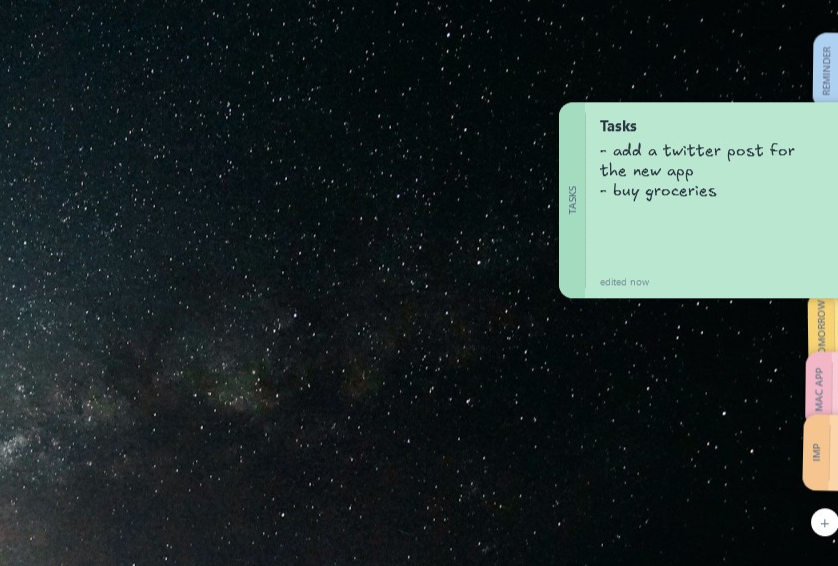
Peeky Notes never uploads your notes, and has no reminders, no sync and no phone app. A licence covers two devices. The home page shows how the deck works, and our article on why sticky notes belong at the edge of the screen explains the thinking behind it.
Stickene
Stickene is free on Windows and Android. It adds one-off and repeating reminders that slide out at the edge, tags, Markdown and attachments, and optional sync with no account, encrypted on the device; its faster “On change” and “Instant” sync modes are in a free beta you apply for. The Windows version is an installer from its website, which explains what to do if Windows shows a “Windows protected your PC” message on first run.
Stickies.lol
Stickies.lol, listed in the Microsoft Store as Stickies Notes, is not the same app as Zhorn Software's Stickies. It adds slash commands, a PIN lock for private notes, pop-out notes that can stay on top and Markdown export, and encrypts notes with Windows' own DPAPI. A licence covers three PCs, and the app comes from the Microsoft Store or as a direct download.
TabStick
TabStick works at the edge of each window rather than the screen. Drop one of its nine coloured stickers onto a window and its note stays beside it, moving and minimising with the window, up to three per window; a note can also sit on the desktop on its own. Nine notes is the limit, by design. It is free for personal and commercial use.
Microsoft's own notes sidebar: docking the new Sticky Notes
Microsoft has a free option of its own. The newer Sticky Notes built into the OneNote app, opened with WinAltS, can dock to the desktop “for a convenient side-by-side experience while using other apps”, and a note you pop out can be pinned above other windows. When it rolled out in May 2024, Microsoft listed a known issue: its “Dock to Desktop” feature “does not work well with extended monitor”. In September 2024 Microsoft added that it is not available where a workplace uses Intune policy on Windows, or with an Office LTSC licence.
The classic Microsoft Sticky Notes app cannot keep a note on top of other apps, according to Microsoft's support pages. Our comparison of Peeky Notes and Microsoft Sticky Notes covers both Microsoft apps.
How to choose a screen-edge notes app
- If you liked SideNotes' sliding panel: EdgeNotes slides out as one panel with a list of your notes. EdgeNote's panel adds spreadsheets, widgets and games, if a yearly subscription suits you.
- If you liked the Hold My Notes deck: NotePebble, Peeky Notes, Stickene and Stickies.lol each keep a thin strip at the edge that opens into your notes when you point at it; HideNStick Notes opens when you bump the edge twice.
- Free: Stickene, or TabStick if you would rather keep notes beside the windows they belong to. Microsoft's newer Sticky Notes, part of the free OneNote app, docks to the desktop.
- Notes on your phone too: Stickene has an Android app; none of the other apps in the table lists a phone app. For an iPhone or the web as well, see the last point.
- Reminders: Stickene, or EdgeNote's reminders widget. Peeky Notes has none.
- Several monitors: HideNStick Notes opens on the screen you are using, and Stickies.lol can keep its dock on whichever screen the mouse is on; Peeky Notes stays on one display you choose (see sticky notes on multiple monitors).
- Notes as files other apps can open: EdgeNotes stores each note as its own file in a folder you choose; Stickene, NotePebble, Peeky Notes, Stickies.lol and TabStick can export notes as Markdown or text files.
- One payment, notes kept on the PC: EdgeNotes, HideNStick Notes, NotePebble, Peeky Notes and Stickies.lol. HideNStick Notes, NotePebble and Stickies.lol say they need no account at all; Peeky Notes needs none for its trial and asks you to sign in to use a licence.
- Something else entirely: if you need your notes on your phone and the web as well as your PC, use the classic Microsoft Sticky Notes, which is free and, once you sign in, syncs to OneNote on iPhone, iPad and Android and to the web. For alarms, folders or notes tied to other programs, our roundup of sticky notes apps for Windows covers the wider field.
If you pick Peeky Notes, getting started with Peeky Notes walks through the first steps. The 7-day trial needs no account, no email and no card.
Questions
Is SideNotes available for Windows?
No. As of November 2026, SideNotes runs only on macOS 13 or later, with a separate app for iPhone and iPad, and its App Store listing says “Only for Mac”. On Windows, EdgeNote, EdgeNotes, HideNStick Notes, NotePebble, Peeky Notes, Stickene and Stickies.lol keep notes at the screen edge in a similar way.
Is there a Hold My Notes for Windows?
No: Hold My Notes needs macOS 13 or later. Peeky Notes, which we make, was inspired by it and rebuilds the idea for Windows 10 and 11, and Stickies.lol, another Windows app, also names Hold My Notes as its inspiration.
Is there a free SideNotes alternative for Windows?
Yes. Stickene is free for Windows 10 and 11, keeps notes just past the right edge of the screen and has an Android app. TabStick is free too but attaches notes beside individual windows, and Microsoft's newer Sticky Notes, part of the free OneNote app, can dock to the desktop.
Can I get a notes sidebar in Windows 11?
Yes, with an app that keeps notes at a screen edge, such as EdgeNote, HideNStick Notes, NotePebble, Peeky Notes, Stickene or Stickies.lol. Microsoft's own option is the newer Sticky Notes in the OneNote app, which WinAltS opens and which can dock to the desktop beside your other apps.
Do screen-edge notes apps work with two monitors?
They differ. HideNStick Notes opens on whichever screen you are using, Stickies.lol can keep its dock on whichever screen the mouse is on, and Peeky Notes keeps its deck on one display you choose. When Microsoft's newer Sticky Notes rolled out in May 2024, Microsoft said its docking “does not work well with extended monitor”.
Sources
Checked on 16 November 2026. Apps change - if something here has gone out of date, write to [email protected] and it will be corrected.
- SideNotes: notes without app switching - Apptorium
- SideNotes: Screen Edge Notes - Mac App Store
- Sticky notes docked to the edge of your Mac - Hold My Notes
- EdgeNote: notes at the edge of your Windows screen - uziapps
- Subscribe to EdgeNote - uziapps
- EdgeNote FAQ - uziapps
- Download EdgeNote - uziapps
- EdgeNote - Microsoft Store
- EdgeNotes - Microsoft Store
- HideNStick Notes: sticky notes that hide on your screen edge - HideNStick Notes
- HideNStick Notes - Microsoft Store
- Sticky notes on the edge of your Windows screen - NotePebble
- What's new in NotePebble - NotePebble
- NotePebble: Sticky Notes - Microsoft Store
- Stickene: notes that weigh nothing - Stickene
- Stickene for Android - Stickene
- Apply for the Stickene beta - Stickene
- Stickene releases - Stickene
- Sticky notes for Windows 11 and 10 that dock to your screen edge - Stickies.lol
- Stickies changelog - Stickies.lol
- Stickies Notes - Microsoft Store
- TabStick: index notes for windows - TabStick
- TabStick releases - GitHub
- Remember better with the new Sticky Notes experience from OneNote - Microsoft 365 Blog
- OneNote's new Sticky Notes feature for Windows receives update - Microsoft 365 Blog
- Making it easier to get to the OneNote app on Windows - Microsoft 365 Blog
- Get started with Sticky Notes - Microsoft Support
- See your sticky notes on other devices and the web - Microsoft Support
- Microsoft Sticky Notes - Microsoft Store

Peeky Notes
Sticky notes for Windows 10 and 11
Notes that wait at the edge of your screen.
Seven days with everything unlocked, no account and no card. Then one licence, bought once - and if you never buy, your notes stay readable and exportable.
 Peeky Notes